

Note
Go to the end to download the full example code.
Simple linear Network#
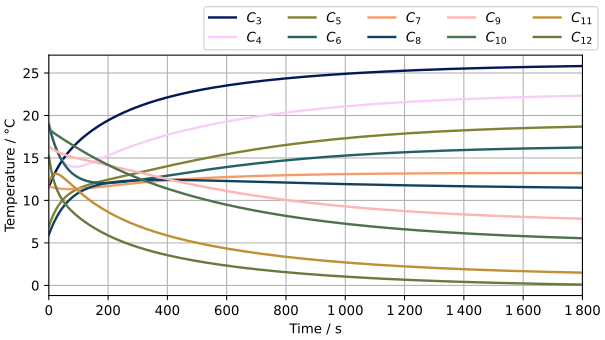
This example builds up a simple linear network using Capacitors and Resistors with random resistances and capacities, wrapped up in BoundaryConditions. At the end, it plots the result over the time for each Capacitor.
# sphinx_gallery_tags = ["network","solving","build"]
# sphinx_gallery_thumbnail_path = "_static/examples/linear_rc_network.svg"

import numpy as np
from leanplot import LinePlot

from pyrc import BoundaryCondition, Capacitor, RCNetwork, Resistor
Create functions for random initialized Capacitors and Resistors#
rng = np.random.default_rng(42)


def random_value():
    return rng.uniform(low=5, high=20)


def random_capacitor() -> Capacitor:
    return Capacitor(
        capacity=random_value(),
        temperature=random_value(),
    )


def random_resistor() -> Resistor:
    return Resistor(
        resistance=random_value(),
    )
Create the boundary conditions#
One of it is warm, one cold.
bc_warm = BoundaryCondition(30)
bc_cold = BoundaryCondition(-4)
Create the network by adding all building blocks and connect them#
capacitors: list[Capacitor] = [random_capacitor()]
resistors: list[Resistor] = [random_resistor()]

# Connect first capacitor to boundary condition
resistors[-1].double_connect(bc_warm, capacitors[-1])

for n in range(10 - 1):
    resistors.append(random_resistor())
    capacitors.append(random_capacitor())
    resistors[-1].double_connect(capacitors[-2], capacitors[-1])
Connect the boundary condition using a new Resistor
resistors.append(random_resistor())
resistors[-1].double_connect(capacitors[-1], bc_cold)
Add the objects (Capacitors, Resistors, BCs) to an RCNetwork object#
The RCNetwork class is used to solve the RC network. It just needs all the building parts in its RCObject. Also, we want a resolution of 1 second so we set the settings accordingly.
network = RCNetwork(load_from_pickle=False, load_solution=False)
network.rc_objects.set_lists(capacitors=capacitors, resistors=resistors, boundaries=[bc_warm, bc_cold])
network.settings.save_all_x_seconds = 1
Solve network for the first 30 Minutes#
network.solve_network(t_span=(0, 1800), print_progress=True)
Print solution#
It uses the own LinePlot class and creates LaTeX-Labels for each Capacitor. The y-values must be transposed because we are not plotting over the nodes but over time.
plot = LinePlot(
    x=network.rc_solution.t,
    ys=network.rc_solution.y.T,
    labels=[f"$C_{{{c.id}}}$" for c in capacitors],
    x_title="Time / s",
    y_title="Temperature / °C",
)
plot.plot()
plot.show_legend(ncols=5)
plot.show()
The result looks like this (or at least quite similar; the picture might be from an earlier version):